Try Bernini AI Now
Enter a text prompt or upload an image to generate AI video in your browser. Switch between Bernini AI generation, editing, and other engines from the same interface.
0 / 5000
Made with Bernini AI
Browse video clips, edits, and stills produced with Bernini AI and the other engines on this platform. See the range of styles and tasks before you start your own.


What Is Bernini AI?
Bernini AI runs Bernini, ByteDance's open framework for video generation and editing, released under the Apache 2.0 license (paper: "Bernini: Latent Semantic Planning for Video Diffusion"). Rather than a single-purpose generator, Bernini handles a full range of tasks in one model — text-to-video, reference-to-video, prompt-based video editing, reference-guided editing, and content insertion, plus image generation and editing. It is built from an MLLM-based semantic planner and a DiT-based renderer, a design that lets the same system both reason about a scene and render it at the pixel level.
What makes Bernini AI distinctive is its division of labor. The MLLM planner, built on Qwen2.5-VL, predicts what the result should look like as a semantic representation and uses chain-of-thought reasoning for complex instructions; the DiT renderer, built on Wan2.2, turns that plan into frames and — for editing tasks — draws on the source video's own features to keep fine detail intact. A Segment-Aware 3D positional encoding (SA-3D RoPE) helps the model keep multiple inputs, such as a source clip and several reference images, cleanly separated. In ByteDance's own benchmarks, Bernini reaches the first tier of leading closed-source models on video editing and leads on subject consistency, though the team notes that raw text-to-video visual quality still trails the strongest closed systems.
Running Bernini yourself takes Hopper-class GPUs such as the H100 and a multi-GPU setup — out of reach for most creators. Bernini AI removes that barrier by bringing the workflow online: generate video from a text prompt, edit an existing clip by describing the change, or drive a new clip from up to five reference images, all in the browser. Alongside Bernini, the platform offers other video and image engines so you can match the right tool to each task — but Bernini AI keeps generation and editing in one place, with no GPU to manage and nothing to install.
Other AI Engines Available Online
Bernini AI leads the workspace for video generation and editing. These additional engines cover formats and tasks beyond Bernini — extra video models, high-resolution image generation, and post-production editing.
Seedance
VideoByteDance's commercial video engine, available here for text-to-video and image-to-video with synchronized audio. A strong alternative when you want a polished, ready-to-publish clip from a single prompt.
Kling
VideoKuaishou's Kling generates multi-shot video across standard and pro modes, handling scene transitions in one prompt. It also powers Motion Control, transferring full-body motion from a reference clip onto a character image.
Veo
VideoGoogle DeepMind's Veo produces short, cinema-grade clips with built-in audio and strong environmental realism. It supports first-and-last-frame control for precise scene bookending.
GPT Image
ImageOpenAI's image model, tuned for accurate text inside the image. The pick when your prompt includes readable labels, logos, or signage that must stay legible in the output.
Flux Pro
ImageBlack Forest Labs' image engine built for speed and throughput across multiple aspect ratios — suited to product shots, social content, and fast iteration.
Nano Banana
ImageGoogle's character-consistency image engine. It accepts multiple reference images to hold a face, outfit, or brand mark steady across a whole series.
Seedream
ImageByteDance's native 4K image engine, producing ultra-high-resolution stills across wide aspect ratios with step-by-step visual reasoning for coherent, detailed scenes.
Generation and Editing in One Model
Bernini AI unifies text-to-video, video editing, and reference-driven generation in a single model. Dedicated image engines round out the workspace for design, typography, and high-resolution stills.
AI Video Generator
Bernini AI generates video from a text prompt and edits existing footage from the same workspace — restyle clips, swap or insert objects, and change weather or style. Reference-to-video drives fresh clips from up to five images, and Kling and Veo are on hand for multi-shot sequences and cinema-grade output.
Create VideoAI Image Generator
High-resolution image generation and editing alongside Bernini AI video. GPT Image for accurate in-image text, Seedream for native 4K across wide aspect ratios, Flux for fast iteration, and Nano Banana for consistent characters across a series. Text-to-image and image-to-image side by side.
Create ImageWhy Use Bernini AI
Bernini AI brings ByteDance's video generation and editing model online — one place to create, edit, and reference-drive video without a multi-GPU rig.
Generation and Editing in One Model
Bernini AI is a unified framework that handles text-to-video, reference-to-video, and prompt-based video editing in a single model — no separate tools for creating versus editing. The same Bernini AI workspace takes you from a blank prompt to a finished, edited clip.
Multimodal Reference Control
Bernini AI reasons over text, source images, and source video together. Reference-to-video accepts up to five reference images to anchor a subject, object, or style, while reference-guided editing can swap garments, replace objects, or change materials, weather, and overall look across an existing clip.
Semantic-Planning Architecture
Bernini AI pairs an MLLM-based semantic planner with a DiT-based renderer. The planner, built on Qwen2.5-VL, reasons about what the edit or scene should become in embedding space; the renderer, built on Wan2.2, synthesizes the pixels and uses source-video features to preserve fine detail during editing.
Strong Editing Consistency
In ByteDance's own evaluation, Bernini reaches the first tier of leading closed-source models on video editing, with particular strength in keeping unedited regions stable and preserving subject identity. That makes Bernini AI well suited to targeted edits where everything outside the change has to stay intact.
Run Bernini AI Online — No H100
Bernini is open source under Apache 2.0, but self-hosting calls for Hopper-class GPUs like the H100. Bernini AI runs the workflow in your browser instead — no GPU to rent, nothing to install — so you can generate and edit video from any machine.
How to Use Bernini AI in 3 Steps
From prompt to finished clip in three steps — no GPU, no installation, no prior experience.
Write a prompt or upload reference media
Describe the video you want, or upload what you want to work from — a source clip to edit, or up to five reference images to drive a subject or style. For pure text-to-video, a prompt alone is enough. Bernini AI reads text, image, and video inputs together.
Generate or edit with Bernini AI
Choose your task — text-to-video, reference-to-video, or prompt-based editing of an existing clip. Bernini AI's semantic planner works out the target, then the renderer produces the frames. Want a different look? Adjust the prompt or references and run it again.
Download your video
Generation runs in the cloud and finishes in minutes depending on length and complexity. Download the result when it is ready, with commercial usage on paid plans — ready for social media, advertising, branded content, and client work.
Frequently Asked Questions About Bernini AI
What Bernini AI is, how to use it online, what it can generate and edit, and how it compares to other AI video models.
Bernini AI is where you can use Bernini — ByteDance's open model for AI video generation and editing — directly in your browser. A single model handles text-to-video, reference-to-video, prompt-based video editing, reference-guided editing, and content insertion, along with image generation and editing. Under the hood it pairs an MLLM-based semantic planner (built on Qwen2.5-VL) with a DiT-based renderer (built on Wan2.2), and it ships as open source under the Apache 2.0 license. On this site you can generate and edit video without setting up the model yourself.
Bernini AI covers both generation and editing in one model. For generation, it does text-to-video, image-to-video, and reference-to-video from up to five reference images. For editing, it can restyle a clip, change a subject's motion, replace or insert objects, swap garments, and adjust materials, weather, or overall look from a text prompt — while keeping the rest of the footage consistent. It also handles image generation and image editing. That range is what sets Bernini AI apart from generators that only create video from scratch.
Open the generator on this site, enter a text prompt or upload your media — a clip to edit or reference images to work from — and pick your task. Bernini AI runs in the cloud, so there is no GPU to rent and nothing to install; results come back to your browser in minutes. Self-hosting the open-source model requires Hopper-class GPUs like the H100, which is exactly the step this platform removes.
Yes. ByteDance released Bernini under the Apache 2.0 license, with the inference code and renderer weights published on GitHub and Hugging Face. Anyone can read the paper, inspect the code, and run the model — but doing so calls for Hopper-class GPUs (H100/H800/H200) and a multi-GPU configuration. Bernini AI offers a hosted alternative so you can use the same kind of generation and editing workflow online without that hardware.
Bernini AI splits the job between two components. An MLLM-based semantic planner, built on Qwen2.5-VL, reasons over your text, images, and any source video and predicts the target as a semantic representation in embedding space, using chain-of-thought for complex edits. A DiT-based renderer, built on Wan2.2, then synthesizes the actual frames from that plan, drawing on the source video's features to preserve detail when editing. A Segment-Aware 3D RoPE keeps multiple inputs distinct, so the model can tell a source clip apart from reference images.
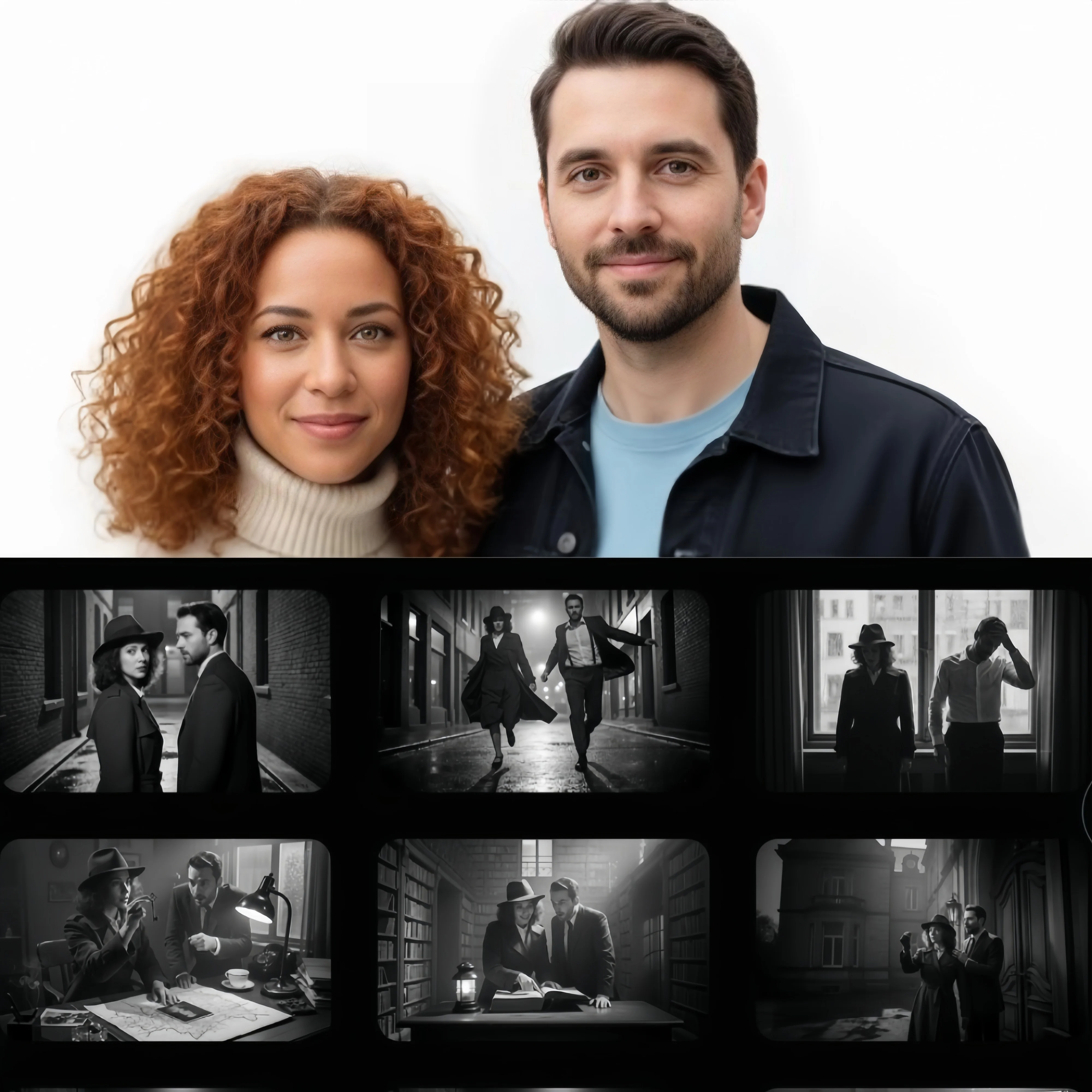
Reference-to-video lets you drive a new clip from images rather than describing everything in words. With Bernini AI you can supply up to five reference images — of a person, an object, or a style — and the model generates video that keeps those references consistent. It is useful for putting a specific character or product into motion, or for holding a visual style steady across a clip, and it can be combined with a text prompt for finer direction.
Yes — editing is one of Bernini AI's core strengths. Give it a source clip and a prompt, and it can restyle the footage, change a subject's motion, replace or insert objects, swap clothing, or alter materials, weather, and overall look. Reference-guided editing lets you steer those changes with an extra image. Throughout, Bernini AI is designed to keep the regions you did not ask to change stable, which is where it scores especially well in ByteDance's editing benchmarks.
Bernini AI's main edge is unified generation and editing plus strong editing consistency: in ByteDance's published benchmarks it reaches the first tier of leading closed-source models on video editing and leads on subject identity. Its trade-off, noted by the team itself, is that raw text-to-video visual quality still trails the strongest closed systems, and complex edits work best with a detailed prompt. Models like Kling and Veo focus on polished generation and longer or cinema-grade clips. Because this platform offers several engines, you can run the same idea on more than one and keep what fits — but Bernini AI is the one that does both creating and editing in a single model.
The open-source Bernini renderer generates at 480p and 16fps by default, with examples shown up to 720p and 24fps, in short clips. It targets quality, consistency, and editing accuracy rather than long-form or ultra-high-resolution output. When you need higher resolution or longer, multi-shot clips, this platform also offers engines such as Kling and Seedream for those formats, so you can pick the right tool per task.
Yes — you can use the videos and images you create with Bernini AI commercially. Output from paid plans comes without a watermark and is cleared for social media, advertising, branded content, product videos, and client work, with no attribution required. Bernini itself ships under the permissive Apache 2.0 license, so the underlying model is open for commercial use as well.
Start Creating with Bernini AI
Bernini AI brings ByteDance's video generation and editing model online. Generate video from a prompt, edit existing footage, and drive clips from reference images.